TL;DR — read this first
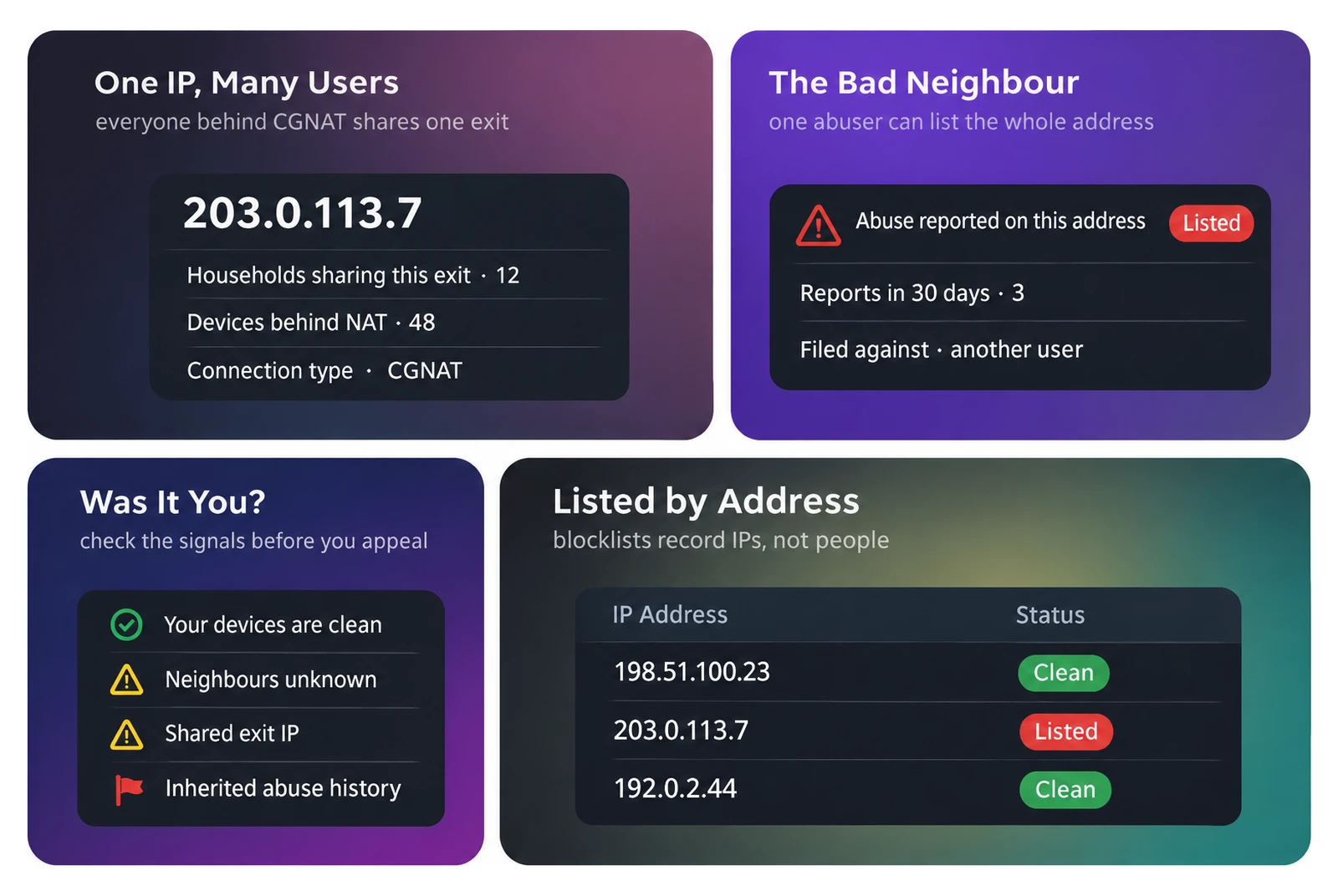
- Yes, sharing bandwidth can get your IP blacklisted. Blocklists record IP addresses, not people — when many users share one public address, one user's spam, malware, or scraping can get the whole address listed, and everyone behind it inherits the listing.
- "Blacklisted" is not one universal status. There are many independent lists — DNS blocklists (DNSBLs/RBLs), reputation databases, and policy lists — each with its own criteria. Identify the exact list before changing anything.
- The most common sharing traps are CGNAT mobile and ISP connections, shared home or building Wi-Fi, public Wi-Fi, VPN/proxy exits, and hosting neighbours on the same server range. A dynamic IP reassigned from a previous user is the same problem in a different shape.
- Many platforms know an address is shared and soften the penalty — an extra verification step instead of a block — but a current listing on a major list can still hurt, especially for email and account sign-ups.
- The fix order is the same as always: identify the list, find out whether the cause is yours or a neighbour's, stop the cause you control, then follow the list operator's removal process. Rotating to a new IP or turning on a VPN does not fix the underlying problem.
Our pillar guide explains why your IP is blacklisted, the 7 causes, and the removal process. This article zooms in on one of those causes — the shared address — because it is the one where innocent users most often get caught: nothing on your own devices is wrong, and yet the IP is listed anyway.
What "blacklisted" actually means
Before the sharing question makes sense, the word itself needs unpacking, because "IP blacklist meaning" is one of the most-searched phrases behind this topic — and the answer is less simple than it sounds.
An IP blacklist is a list of addresses that a reputation provider associates with spam, malware, botnets, suspicious automation, or a policy category. The best-known form is the DNS-based blocklist (DNSBL or RBL): a mail server or platform queries the list by IP address and gets back a yes/no answer. Commercial reputation databases work the same way at a larger scale, assigning scores built from observed behaviour.
Three facts about these lists explain almost everything that follows:
- Lists are per address, not per person. A list has no idea who you are. It records that traffic from an address looked abusive, and it attaches that record to the address.
- Lists are independent. Being clear on one database says nothing about another. An address can be clean on Spamhaus and listed on UCEPROTECT, or the other way round — and a receiving network may cache a listing for a while after the operator removes it.
- Some listings are policy, not accusation. A policy list can flag an address simply because of what it is — for example, a dynamic residential range that should not be sending mail directly — without claiming anyone behind it misbehaved. The fix for a policy listing is different: usually an authorized relay, not a removal request.
So when someone asks "why would an IP get blacklisted?", the honest answer is that there is no single reason. Spam, malware, scraping, and misconfiguration are the usual suspects — and sharing an address with the wrong neighbour is one of the most common ways an innocent user ends up on a list they never earned.
The short answer: yes, and here is why
Bandwidth sharing means many users, devices, or customers exit to the internet through one public IP address. The outside world — including every blocklist operator — sees only that one address. It cannot see your laptop, your phone, or your neighbour's infected camera separately. So when one of them misbehaves, the record lands on the shared address, and every user behind it shares the consequence.
This is not a rare edge case. IPv4 addresses ran out years ago, so carriers and providers share them aggressively. The sharing takes several forms, and each one carries a different level of risk.
Six ways sharing gets an innocent IP listed
1. CGNAT: your mobile carrier and many ISPs share your address
Carrier-grade NAT (CGNAT, also called NAT444) is the biggest sharing mechanism most people never hear about. Because there are not enough public IPv4 addresses to give every subscriber one of their own, carriers put dozens — sometimes thousands — of subscribers behind a single public address, translating traffic on the fly. Subscribers typically receive a private address from the 100.64.0.0/10 range reserved for this purpose (RFC 6598).
If one subscriber on that exit sends spam or runs a scanner, the public address can end up on a blocklist, and every other subscriber on the same exit is affected. Mobile networks are the classic case: a single CGNAT address can sit in front of an entire metro region's worth of phones.
The mitigating factor is that reputation systems know this. Blocking a whole mobile exit because of one abuse record would lock out thousands of legitimate users, so many systems reduce the weight of the IP signal for mobile and CGNAT addresses and lean more on account history, device, and behaviour signals. The same listing that gets a datacenter IP blocked outright may only cost a mobile user an extra verification step. But "softer" is not "harmless": email delivery and strict sign-up checks can still fail.
2. Shared home and building broadband
A family Wi-Fi network is a small-scale version of the same problem: every device in the house — phones, laptops, smart TVs, cameras, a teenager's game console — shares the home's one public IP. One compromised device, one piece of malware phoning home to a command-and-control server, or one misconfigured mail setup can list the household address.
Apartment buildings and shared offices scale it up: one broadband line split across many flats or desks, one public IP, dozens of strangers' devices behind it. You cannot audit your neighbours' devices, and you cannot stop them from getting infected — which is exactly why this form of sharing feels so unfair when it bites.
3. Public Wi-Fi and office NAT
Coffee-shop, hotel, airport, and office networks all put many users behind one or a few public addresses. A single guest running a scraper or a spambot can list the address for everyone else on the network that day. This is also why "the Wi-Fi worked yesterday and not today" is a familiar complaint: the listing may be fresh, and it may clear on its own once the abuse stops and the list ages the entry out.
4. VPN and proxy exits: sharing with thousands of strangers
A commercial VPN exit is the most concentrated form of sharing. Thousands of subscribers route through the same server addresses, and those addresses frequently appear in abuse feeds — partly because abusers use the same VPNs, partly because the exit hides who is who. Tor works the same way at the exit: it is an anonymity tool whose traffic winds through relays before exiting, and its exit list is public, so checkers can identify Tor exits directly.
This is why turning on a VPN to "fix" a blacklisted IP usually makes things worse, not better: you trade an address with one listing for an exit shared with thousands of strangers and its own reputation history. The pillar guide covers this in detail — a VPN does not repair a blacklisted address.
5. Hosting neighbours: the VPS and shared-hosting version
On a VPS or shared host, your "neighbour" is another customer on the same machine or the same address range. One customer's spam run or compromised site can list the shared IP, or — with range-based lists such as UCEPROTECT Level 3 — the whole provider network, once enough addresses in it misbehave. Large hosting providers sit on some range lists semi-permanently for this reason, which is one more reason consumer platforms treat hosting ASNs with suspicion from the start.
6. The previous tenant: dynamic IPs with a history
Strictly speaking this is not simultaneous sharing, but it feels identical to the victim: your ISP hands you a dynamic address that a previous subscriber got listed, and you inherit the record. The address changed hands; the listing did not. Restarting your connection to get a fresh address sometimes clears it instantly — which is also a useful diagnostic, as the next section explains.
How to tell whether it was you or a neighbour
A listing on a shared address does not tell you who caused it. These checks narrow it down:
- Identify the exact list and the listing reason. Check the address against several DNSBLs and note which lists flag it, the category, and the timestamp. A spam-trap hit from last week points at recent traffic; a policy listing (for example, a dynamic range that should not send mail) points at the address type, not at anyone's behaviour. The pillar guide's first section walks through exactly what to record.
- Check your own devices first. Scan the devices on your network for malware, look for unknown mail traffic, and check whether anything is sending mail or scanning ports without you knowing. If your own house is clean, the cause is very likely a neighbour — or a previous tenant.
- Test from a different network. Check the same account or service from mobile data instead of home broadband (or vice versa). If the problem follows the IP address rather than the account or device, the address is the problem.
- Restart or rotate the connection. If your ISP gives you a new dynamic address on reconnect and the problem disappears, the old address's history — yours, a neighbour's, or a previous tenant's — was the issue. If it persists across addresses, look at your own devices and accounts instead.
- Ask the provider. For CGNAT or building broadband, only the ISP can see which subscriber generated the abusive traffic (it needs the public IP, port range, and timestamp). A report to the ISP with the listing details is often the only way the real cause gets stopped — and the only way a repeat listing gets prevented.
What to do about it
The order matters, and it is the same order as the pillar guide's removal process — identify, stop the cause, then request removal:
- Stop any cause you control. Clean infected devices, fix misconfigured mail, close an open relay — before requesting removal. Operators reject delisting requests while the abuse is still happening, and a re-listing after a removal hurts more than the first.
- Report what you cannot control. If the cause is a neighbour on shared broadband or CGNAT, report the listing to your ISP or building network administrator with the list name, category, and timestamp. You cannot fix their traffic; they can.
- Follow the operator's official process. Some lists (SpamCop, PSBL, UCEPROTECT Level 1) drop entries automatically once the abuse stops. Others (Spamhaus, Barracuda) want a request after the cause is fixed. There is no shortcut: each list has its own process, and the pillar guide covers it list by list.
- Allow time for caches to update. Even after removal, receiving networks may hold the old verdict for a while. Wait before concluding the fix failed.
- For accounts that matter, get off the shared address. A residential, dedicated IP — an address used only by you — removes the neighbour problem entirely. It is the single most effective structural fix, and it is the same advice the signals-and-rules article gives for a bad score: stop inheriting strangers' behaviour. If your ISP cannot offer one, ask whether a static IP option exists, or whether your connection is behind CGNAT and can be moved off it.
- Do not just keep rotating IPs. Changing addresses hides the symptom without fixing the cause — and if your own device is the source, the new address will be listed again. Fix first, rotate second.
When sharing is fine — and how to keep it that way
Not every shared address is a problem. Most CGNAT mobile users never notice a listing, because the platforms they use most have already discounted the shared-IP signal. Sharing becomes a problem mainly when the address is used for something strict — sending email, registering accounts, logging into a platform that fights automated abuse — and the listing is current and on a major list.
A few habits keep the risk low:
- Keep your own devices clean. You cannot control the neighbours, but you can make sure you are never the neighbour everyone else is complaining about.
- Separate networks for separate jobs. If you run accounts that matter, do not run them over the same public Wi-Fi as everything else, and do not route them through a shared VPN exit.
- Check before the moment that matters. Run a check on the address before an important registration or login, not after a rejection. Scores and listings drift; a check from last week is stale evidence.
- Know which address you are on. If your IP changes every time you reconnect, you are on a dynamic or CGNAT address — expect the occasional inherited listing, and treat a fresh listing as a prompt to check, not a verdict on you.
Check your current IP with IP Ready — free, no sign-up — and read the signals behind the number, not just the number itself. If the blacklist signal is the one hurting you, start with why your IP is blacklisted for the full removal walkthrough, and how IP risk score signals and rules work for why a shared address moves your score.
FAQ
Can bandwidth sharing get my IP address blacklisted?
Yes. Blocklists record IP addresses, not people, so when many users share one public address — through CGNAT, shared home or building broadband, public Wi-Fi, a VPN exit, or a hosting range — one user's spam, malware, or scraping can get the whole address listed. Everyone behind that address inherits the listing until it expires or is removed.
Can bandwidth sharing get my IP address blacklisted in the United States?
Yes, the mechanism is the same everywhere, including the United States — blocklists are global and do not vary by country. What varies is your setup: US mobile carriers and ISPs widely use CGNAT, so a shared-address listing is a common experience there. The fix is also the same: identify the list, find the cause, and follow the operator's removal process.
Why would an IP get blacklisted?
The common reasons are spam (a compromised mailbox or open relay), malware or a botnet using the connection, too many automated requests, sharing the address with other users, an ISP reassigning a previously abused address, a misconfigured server, or a policy listing that flags the address type rather than any behaviour. The full list, with fixes, is in our pillar guide.
What does it mean when an IP is blacklisted?
It means a reputation provider has associated that IP address with spam, malware, suspicious automation, or a policy category. It does not necessarily mean you personally did anything wrong — the listing may come from a shared address, a previous user of the address, or a policy category. It is also not one universal status: there are many independent lists, and an address can be listed on one and clear on another.
How do I know if my IP is blacklisted because of someone else?
Check which list flagged the address and when, scan your own devices for malware, and test from a different network. If your devices are clean, the problem follows the address rather than your account, and a fresh dynamic address clears it, the cause was almost certainly a neighbour on the shared address or a previous tenant — not you.
Does a VPN fix a blacklisted IP?
No. A VPN moves you to an exit shared with thousands of strangers, which carries its own reputation history — often worse than the address you left. And some listings are policy listings, where the fix is an authorized relay, not a different IP. Fix the cause, then follow the list's removal process.
How long does a blacklisting last?
It depends on the list. Some lists drop entries automatically once the abuse stops; others require a removal request and then take time to propagate, and receiving networks may cache the old verdict for a while longer. If the underlying cause is still active, the address will simply be listed again.
Methodology note: This guide was prepared with AI assistance and reviewed against public technical guidance, including CGNAT and DNSBL documentation (RFC 6598 shared address space; Spamhaus, SpamCop, Barracuda, and UCEPROTECT listing practices). IP intelligence is dynamic, and third-party platforms make their own access and risk decisions.