Why Is ChatGPT Blocking Your IP? 7 Causes and How to Fix It
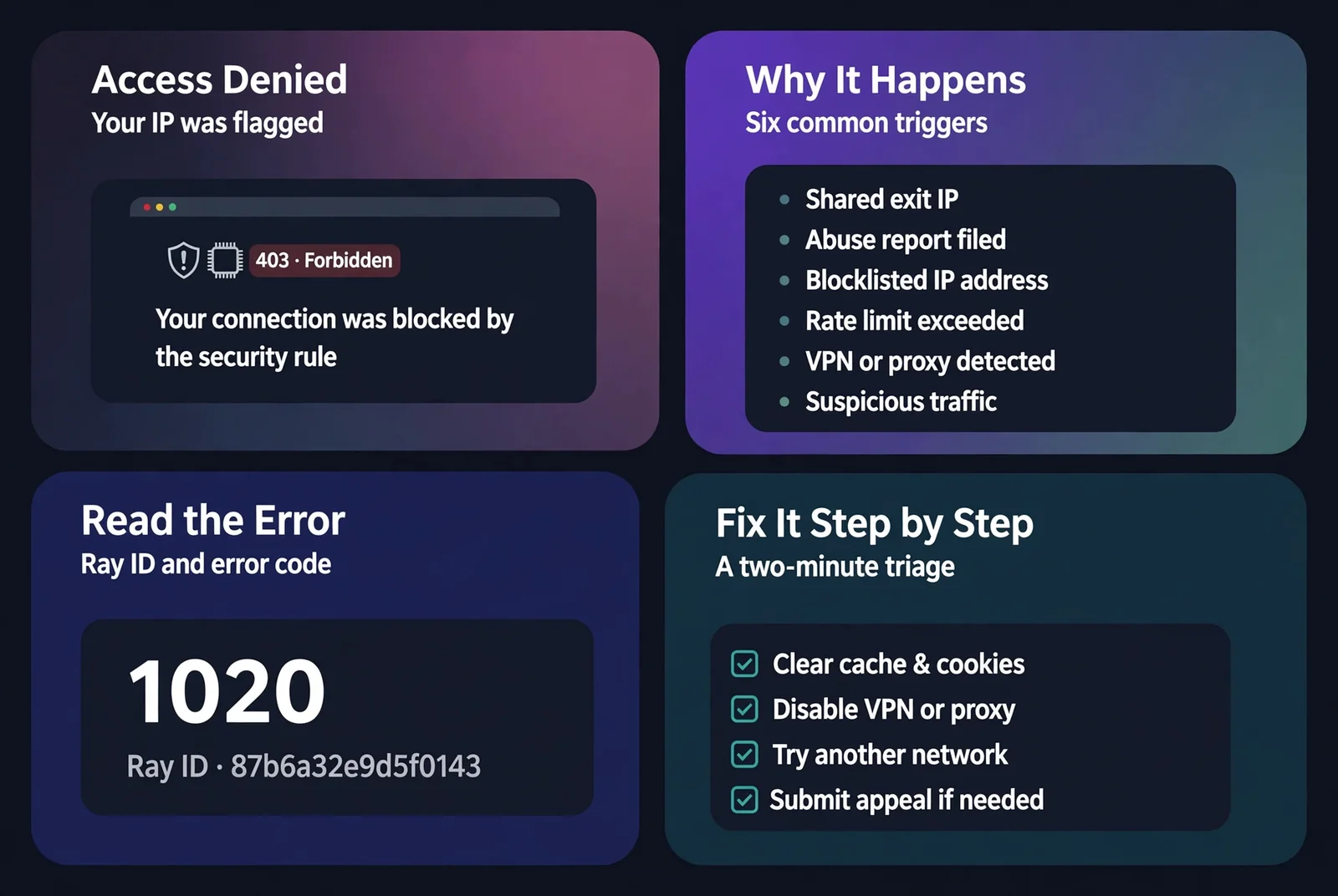
You open ChatGPT and instead of the chat box you get "Error 1020: Access denied" — or Claude just refuses to load. Nothing is wrong with your account. The problem is your IP address: it has been flagged, and the platform won't talk to it.
This is one of the most common IP reputation problems on the internet right now. Here's why it happens and what you can actually do about it.
TL;DR — read this first
- If ChatGPT or Claude won't load, the problem is usually your IP address, not your account — Error 1020 is Cloudflare's code for "this IP address is blocked."
- The most common causes: a VPN or proxy IP, an IP shared with abusers (carrier-grade NAT, public Wi-Fi), a bad history inherited from a previous user, and too many signups or requests from one IP.
- The fixes that work: switch networks, turn off the VPN (or switch to a clean one), restart the router, or wait out rate-limit blocks, which typically clear in 24–48 hours.
- Check an IP's reputation before you switch to it or buy it — a "new" IP can be just as burned as the one you're leaving.
Cause 1: You're on a VPN or proxy IP
This is the number one cause. OpenAI routes ChatGPT through Cloudflare's security layer, which scores every connecting IP. VPN and proxy exit IPs — especially cheap or free ones — are shared by thousands of users, and some of them abuse the service. Once enough abuse comes from one IP, the whole address gets blocked.
Anthropic (Claude) applies similar restrictions to datacenter and VPN ranges.
Cause 2: Your IP is shared with abusers
Even without a VPN, your IP might be shared. Mobile carriers put thousands of users behind a handful of public IPs (carrier-grade NAT). Public Wi-Fi, office networks, and university campuses work the same way. If one person on that shared IP spams or scrapes, everyone behind it can get blocked.
Cause 3: The IP has a bad history
IP addresses get recycled. The address your ISP assigned you today might have belonged to a spammer, a scraper, or a botnet node last month. Blocklists and reputation systems remember. A "new" IP to you can be a burned IP to Cloudflare.
Cause 4: Too many signups or requests from one IP
OpenAI rate-limits signups and API-style usage per IP. Multiple accounts created from the same address in a short window triggers the "too many signups from the same IP" restriction, which usually lasts 24–48 hours but can extend if the pattern looks like evasion.
Cause 5: Cloudflare false positive
Sometimes the block is a mistake. Cloudflare's automated systems occasionally flag legitimate residential IPs — particularly after routing changes or when an ISP reassigns ranges. These blocks are usually temporary.
Cause 6: You're in a restricted region
OpenAI doesn't serve ChatGPT in some countries. If your exit IP geolocates to a restricted region, the edge infrastructure refuses the connection at the network level — no browser fix will help, because the decision is made before your request reaches the app.
Cause 7: Automated tools or browser extensions
Scrapers, automation scripts, and even some aggressive ad-blockers or privacy extensions alter request patterns enough to look bot-like. Repeated non-human request patterns from your IP raise its risk score until access is cut off.
How to fix it
- Check your IP first. Before changing anything, find out what your IP looks like to the internet — its risk score, whether it's flagged as proxy/VPN, and whether it sits on any blocklists. Guessing wastes time.
- Switch networks. Move from Wi-Fi to mobile data (or vice versa). A different exit IP often resolves it instantly — which also confirms the IP was the problem, not your account.
- Turn off the VPN — or switch to a clean one. If you're on a VPN, disconnect and retry. If you need a VPN, avoid free ones; their IPs are the most abused and most blocked.
- Restart your router. On many home connections this assigns a fresh IP from your ISP's pool.
- Wait it out. Rate-limit blocks (like the signup restriction) typically clear in 24–48 hours.
- Check before you commit. If you're buying a proxy or VPN specifically to access these platforms, test the IP's reputation before you pay — not after.
Check your IP before you switch
The fastest way to diagnose an IP block is to see what the internet sees. Check your IP risk score free — it scans 12 signals (ISP, ASN, proxy/VPN/Tor detection, blacklists, abuse history) and shows platform readiness for ChatGPT, Claude, Amazon, eBay, and Binance. If your current IP is flagged, you'll know in seconds — and you'll know whether a new one is actually clean before you switch to it. See how an IP risk score is built before you trust the number.
FAQ
Why does ChatGPT say "Error 1020: Access denied"? Error 1020 is Cloudflare's code for "this IP address is blocked." OpenAI uses Cloudflare to protect ChatGPT, and your IP was flagged — usually because it's a VPN/proxy exit, shared with abusers, or has a bad reputation history.
How do I check if my IP is blocked by ChatGPT? The simplest test: disconnect your VPN and try from mobile data. If it works, your original IP is the problem. For a precise answer, run your IP through a reputation checker to see its risk score and blocklist status.
Can I fix a blocked IP with a VPN? Sometimes — but it's a gamble. VPN exit IPs are among the most-blocked addresses on ChatGPT because they're shared and heavily abused. A VPN can just as easily make the problem worse. Check the VPN's exit IP reputation before relying on it.
How long does a ChatGPT IP block last? Rate-limit blocks (e.g., too many signups) typically clear in 24–48 hours. Reputation-based blocks last until the IP's standing improves, which can be much longer for badly burned addresses.
Does Claude block VPN IPs too? Yes. Anthropic applies similar restrictions to datacenter and VPN IP ranges, so the same diagnosis steps apply if Claude won't load.